Showing posts with label tools for project management. Show all posts

Wednesday, May 29, 2013

Asana - what has been forgotten to implement for $40 million

Who stay behind?

It's always interesting to discuss about products, which have all the luck of popularity among users and trust from investors - this clearly says about the quality. Undoubtedly, Asana online collaboration service belongs to the cohort of such high-end applications. It was launched in 2011 as a startup by Dustin Moskovitz and Justin Rosenstein, who were involved in Facebook development process. Most likely, this very fact allowed attracting $38 million funding into their online collaboration brainchild.
The last of round of this investment has been closed less than year ago, and now the audience of yogis of project managers exceeds tens of thousands. Such popularity, for sure, is interfering with the way Asana is being promoted - free accounts are granted to small teams and individuals for the expectation that some of them will grow sometimes. And sure, these companies would unlikely change the tool they got accustomed to, filled with data, necessary for the work. These expectations, nevertheless, are too bright, and below we’ll see, what’s wrong with them.
As for popularity of this service, it is driven not only by serious spending on acquisition of users. Asana also has a solid engineering basis. The product was built on javascript, and this technology makes online collaboration fully interactive. Updates in tasks and lists are visible without reloading a browser page, so you haven't to constantly push F5 button, in order to see what's new. Former Facebook developers, for sure, know much about technology and its role in surpassing competitors.

Asana's basics.

If you're enough experienced and clearly imagine, how to work with Asana, please, pass through this part of article - you unlikely find it interesting. But if you haven't yet worked with this tool of online collaboration, I recommend you to read it, in order to get the point. 
Online collaboration inside Asana is building up around projects, with tasks stored inside them. Tasks, in their turn, can be broken down into subtasks, when decomposition of complex issue is needed.
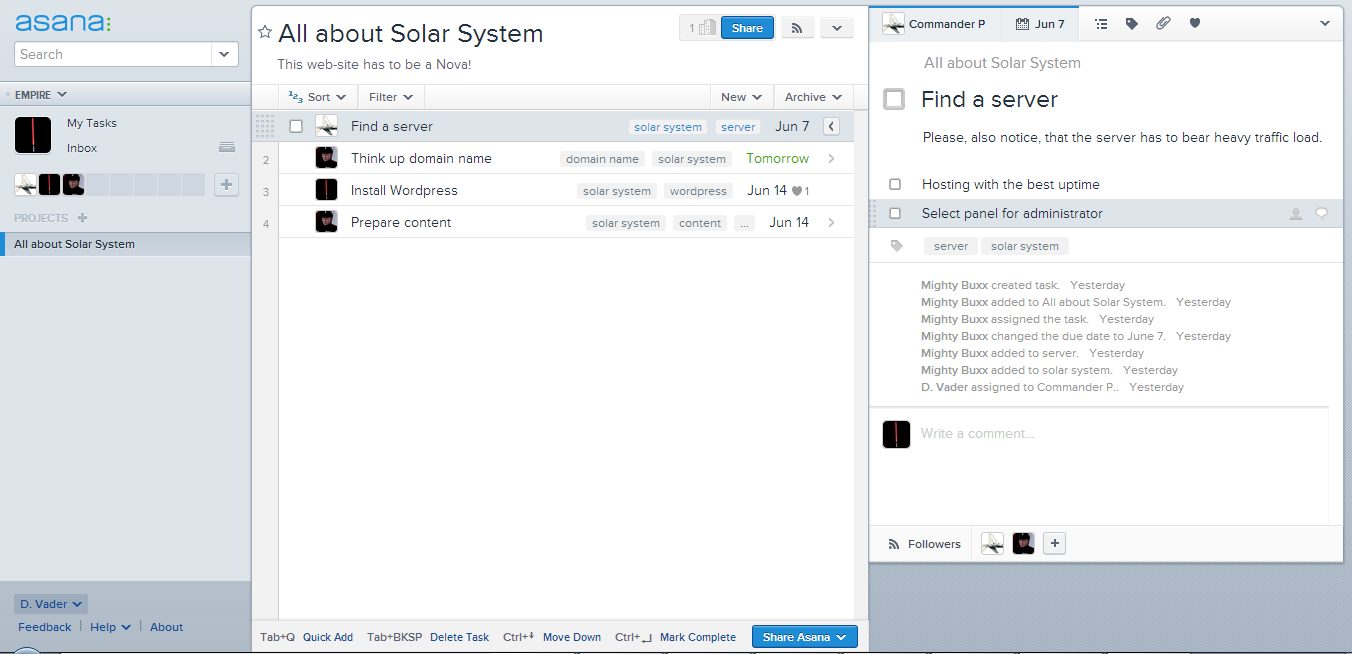
For example, if you want to develop a web-site about astronomy, you should create a new project in Asana, called "All about Solar System" along with list of following tasks - "Think up domain name", "Find a server", "Install Wordpress" and "Prepare content".
Then you have to assign your teammates in order to start the work - carry on conversations, attach files and so on.
Sometimes issues are too complicated to resolve them in one go. For example, if you want to carefully choose a server for astronomy site (because you expect heavy traffic load) you should create into "Find a server" issue few additional subtasks: "Hosting with the best uptime" and "Select panel for administrator". In Asana you can create subtasks in a subtask, so tree-like structure of data for this service is available.
But let's return to the question, how tasks are processed in Asana. When you create an issue for you collaborator, he (or she) has to clearly state, when the work will be done - today, later, or even postpone this task. In order to make your colleague haste, setting a deadline is possible.
This way of working is clear, understandable and creates a nice impression, especially on non-engineers. Sure, somebody can say, that use cases aren't as clear as in RememberTheMilk, but I don't suppose it is a problem. Every tool has to be mastered.

Structure has to be visible!

Sure, along with numerous good points Asana has some disadvantages, and some of them are important.
The first problem relates to invisibility of issues' structure and it doesn't allow running really complex projects, with a deep and entangled inner organisation. Flat lists of tasks cannot crystallize information by giving it a structure, and this, in addition, seriously damage the productivity of work, especially of managers. Why does it happen?
Asana, like any powerful tool for online collaboration, supports deep decomposition of extended issues. You can create subtasks inside a task, and divide newly created items further.
Let's remember about our astronomy web-site and about "Prepare content" task inside this project. In order to deal with the issue you should create subtasks called "Mercury", "Venus", "Earth", etc. If you want to elaborate additional popups describing planets' satellites, you have to add new subtasks to "Jupiter" and "Satur" items - their satellites can easily confuse an administrator responsible for the content. We strongly recommend you not to store information about these celestial bodies inside the same list, if you're not an astronomer or an anthropologist familiar with mythology of different cultures.
And here hides a problem, which puts to end the structure in Asana. You cannot look around, taking in all tasks at once, because interface doesn't support tree view for issues. Left part of Asana screen is always occupied by list of projects, central one is for the tasks of first level only and all the rest is pressed into the right block of the service: task with descriptions, its parent and descendants.
The concept of structure of information in Asana is enough underdeveloped to make running a complex project painful.
Carefully elaborated tree of tasks along with a deep decomposition of issues, have to support easy management of tasks' branches. Users should have a possibility to change tree nodes' descendants and parents, see the structure as a scheme, filter task in a tree and so on. Asana doesn't grant you such functionality because its interface strictly divide information between three types of items: projects, task and subtask. You cannot move a bundle of tasks from one tree node to another, with all comments and attached files, like in askcow or Wrike, and this is a problem.
Full-fledged tree tells tools of project management from bug- or issue trackers, and project managers along with software architects become first victims of such flaws.

Flaws in protection.

The safety of information in Asana is another serious problem of the service, and I don't refer to questions interfering with cryptography and data protection. The story is about errors inherited from human nature. In order to get the point, let's begin with a different approaches to security of data.
First approach consists in limitation of access to information and mixed up with numerous privileges. You have to grant them users and workgroups, in hope, that qualified employee doesn't make mistakes related to data management.
This concept has strong advocates and numerous followers, but in my opinion it is insufficient, because all, even the most skilled people, make errors (and sometimes intentionally). The second problem is constant downtime - collaborators often have to wait until an administrator grant them rights of no importance, possibility to edit a comment or to attach a file, for example. Such restrictions sometimes become ridiculous, you know (JIRA users know this problem well).
The second approach to safety consists in "No delete" principle. This concept is very perspective, but only few of tools of project management fully relies on it. The point of this paradigm is that all information inside the project cannot be destroyed - for example, closed tasks are placed inside a special storage, easily accessible for anyone, who want to restore them. Applying of these approach also assumes, that you can switch between different editions of the same item and, of course, such tools should have a powerful activity log. Currently, the best example of such tool of project management is askcow, where this conception is elaborated to perfection.
Third paradigm of ensuring the information is building up on "Undo" functionality. This conception is implemented in Asana, but it's going not so smooth, as expected, and at least few scenarios fraught with loss of data exist.
One of these scenarios relates to editing of tasks. If your colleagues change something in task, its title or description, the information about primary state of item is destroyed. The significance of this problem is complemented with an easiness of task edition, so you can lose important data occasionally due a misclick. In addition, you cannot undo such action.
Another scenario is also dangerous for the information, and it relates to direct erasing of some issues. You can delete a task without possibility of restoring it. Asana, of course, will offer you to "Undo" such action in corresponding popup, but as soon as you close it, your information is lost, if your e-mail notifications are switched off.
There is at least one case, when you can lose important project, but I offer you to find it by yourself. I'll only say, that it to deleting a project scenario.
Transparency of changes also contributes to unreliable protection of data. Asana activity log behaves strange sometimes and doesn't show complete picture of the situation. Certainly, it has been done deliberately, in order to get users rid of informational noise, generated by collaborators and their activity. This problem can be resolved by applying filters to activity log, but Asana does not.
Poorly elaborated conception of safety of information is the second problem of this online collaboration tool.

Complex project management in Asana: possible or not?

Absence of visualisation of the structure of projects, breaches in scenarios of deleting the information, lack of full-fledged activity log, all these are not critical while you're working on small projects with teams, you’re confident in. And here Asana does its best - the system is simple enough to get accustomed to work with. But, as soon as your projects start to require careful planning, issues start to need deep decomposition, and number of involved collaborator becomes significant, Asana stops fulfilling the purpose of a tool for online collaboration. It stops saving time. Management of long lists of numerous untraceable tasks, which have no clear relations between each other, is a thankless affair.
In addition you have to worry about safety of information related to your projects. Errors interfering with editing descriptions of tasks are usual in Asana. Moreover, someone can damage your information deliberately, and this is a serious problem too.
Anyway, Asana is a high-quality product built on a solid tech foundation, and the popularity of this service is a reliable evidence. But declared adaptability to complex projects is rather a marketing move, than reality. You can hardly tell Asana from RememberTheMilk or Basecamp – their functionality and facility are almost identical, except of possibility to divide subtasks, but this tool is definitely insufficient for full-fledged project management.
I recommend you to register an Asana account, it's free. This tool for online collaboration is worth trying it, and if the project you're running is enough simple, you'll probably find Asana fit.  

Wednesday, May 22, 2013

JIRA 6.0 - slow movement to nowhere

 Let's start!

Today we'll take a look at latest version of Atlassian product - JIRA 6.0 This tool for online collaboration is well known among many of project managers, and JIRA has its fans and haters. I'm not a fun, nor hater, but I worked with previous version a lot, when managed projects in social gaming. 
My teams applied JIRA as a main task manager during development. Before I started running these projects, I was familiar to groupware. I was curious in analysing existing online collaboration services: Basecamp, Acunote, RememberTheMilk, Fogbugz, Asana, because I participated in developing askcow project management tool. That's why my first acquaintance with JIRA was not so painful, in contrast to my colleagues - art and game designers.
The service was enough powerful to support managing small teams, which worked according to Scrum methodology, but lacks and disadvantages of JIRA were hard to ignore. I used this tool for online collaboration much, so how can I keep myself from review of JIRA 6.0 version?

What's new.

The graphical design of the system kept the same structure and only small changes were implemented. Sure, the screen become clearer, but the aptest novelty is "create issue" button, at last accessible in a click. This control is placed now on the redesigned header of working page. This move is absolutely sound - one excessive click for usual and very often use case is a crime against user, especially for the system of such level.
Another important change relates to list of tasks and task fields. Now you can see and manage both of them at the same time. Similar scheme was already introduced by Atlassian earlier in Grasshoper chargeable plug-in, elaborated for Scrum project running, so in JIRA 6.0 this piece of functionality is a long-awaited improvement. In addition, in contrast to Grasshopper extension, now it is possible to edit all task features without opening this task separately - that's nice and makes dealing with issues faster and more comfortable.
You can also change the width of fields, where list of task and task itself are presented. Maybe some JIRA users find this useful, but I'm not. The problems begin when someone describes an issue applying text with structure, trying to emphasize some statements or grouping them. This task assignee will hardly get the point when he'll face this text shifted due another width of task field - bone and even unreadable texts hurt people a lot.
I'd give a tip to JIRA interface engineers, you'd better deal here with irrational empty and non-informative area in the upper part of the screen, seriously. Why do I need to see irrelevant and rare used controls there?
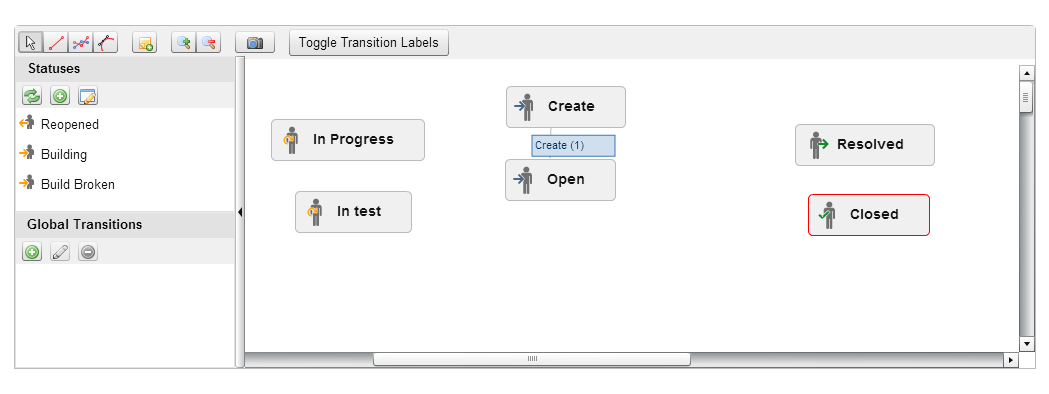
Another important improvement, which matters for me, is a possibility of editing currently active workflows. This part of JIRA functionality was always one of my favorite features, and I always applied adjustable workflows in my work, despite rough and painful related use cases. Unfortunately, the process of workflow customization still remains unclear, and this is its main disadvantage. Alas for me and other users, JIRA developers didn't concentrate their efforts on this issue.
New design for mobile devices is an important area for improvement, everyone goes for mobile, you know, but previous JIRA version was enough comfortable for me and my tablet for dealing with daily scrums and sprint plannings. Along with a board, of course.
As for JIRA disadvantages, the most serious of them remain unfixed.

What was expected.

First, and this gap is the most critical, you have to constantly press F5 and reload the page of your browser in order to see updates in lists and tasks. In addition, switching between the services pages leads to reloading of your browser page. Where's javascript, may I ask? This is an annoying and time-wasting problem, especially, when you worked in Wrike or askcow at least once. The work become dynamic, when you see your project living in your browser, when new tasks and updates in old ones appear at once and you haven't to push F5 constantly. How many important issues were missed by my collaborators due this problem! It is a disastrous drawback, and that's why I gave up using JIRA
Another important disadvantage of JIRA tool is a simplicity of issues you can manage, and the point, of course, is in absence of tree of tasks. You can say that bug-tracker doesn't need this feature, but this is a very arguable issue. Any project manager wants to see the structure of the project he is running, and full-fledged tree of tasks is a must for project management tool. This also relates to Basecamp, Asana and Trello, for example. Why do I need tags, instead of usual search? Look at Wrike, look at askcow!
Third. I don't like interfering using cases and controls. All this remain in JIRA. I want to know about the shortest scenario for reaching the issue I'm currently interesting in, not two or three. I don't need two or three controls designed for the same purpose scattered along the screen. Structure of JIRA interface remains Achilless' heel of this service - it confuses people, and constant time wasting explanation is the only solution, especially when you collaborate with non-engineers.

Move along, citizens, that's nothing to see here.

Resuming this brief review, I can firmly say, that JIRA remains the same for a ordinary user. It definitely didn't become clearer, only a bit faster, thanks to integrated tasks and lists of them. The direction in which JIRA developers move is correct in general, but main problems of this tool for online collaboration - lack of project structure and of interactivity - remain unresolved.
Anyway, JIRA is good enough to prefer it to Asana or Basecamp, especially if you're experienced, but Wrike and askcow continue to remain the most advanced tools for agile project management at the moment.
You can read more about JIRA 6.0 on developers blog or here, if you're looking for details.


PS. Attention! Sarcasm warning! I want to congratulate JIRA developers on introducing long awaited possibility to change user name. At least you've done it, fellows! Ten years later.
Яндекс.Метрика